AOE Summer Classes
Aug 15, 2011

Posted by | 11 Comments

How to Remember Student Names

With class rosters anywhere between 200-800, art teachers are the masters at remembering student names, but it sure isn’t easy!  Some teachers use little name tents or name tags at first to help them remember. For some reason, this method never works for me, because I rely on the name tag too much and never really concentrate on remembering the name!

My trick?

Alphabetize the students by FIRST NAME!

Put all the A’s and B’s at one table, and so on… When Cory, Cody and Carmen are all sitting together it really helps you to at least get a head start on their names.  If you type up your rosters in Word, there is a tool that has an AZ sort. Highlight your list and it will put them in ABC order for you. Easy!  I do this for my kindergarten students only, however, when I have been placed at a new school I do this will all students. I already know the names of my 1st-5th graders because I’ve had them for several years. For these students, I make a seating chart based upon behaviors. Fun times! :)

I also organize my seating charts by day, not by grade level, so I can easily find that class ,or just keep the seating chart and grade book (which I house together) open for that day’s teaching. It really helps! I secure these with rings and put them onto a clip board. This gives me flexibility to add pages, change things around and flip the chart quickly.
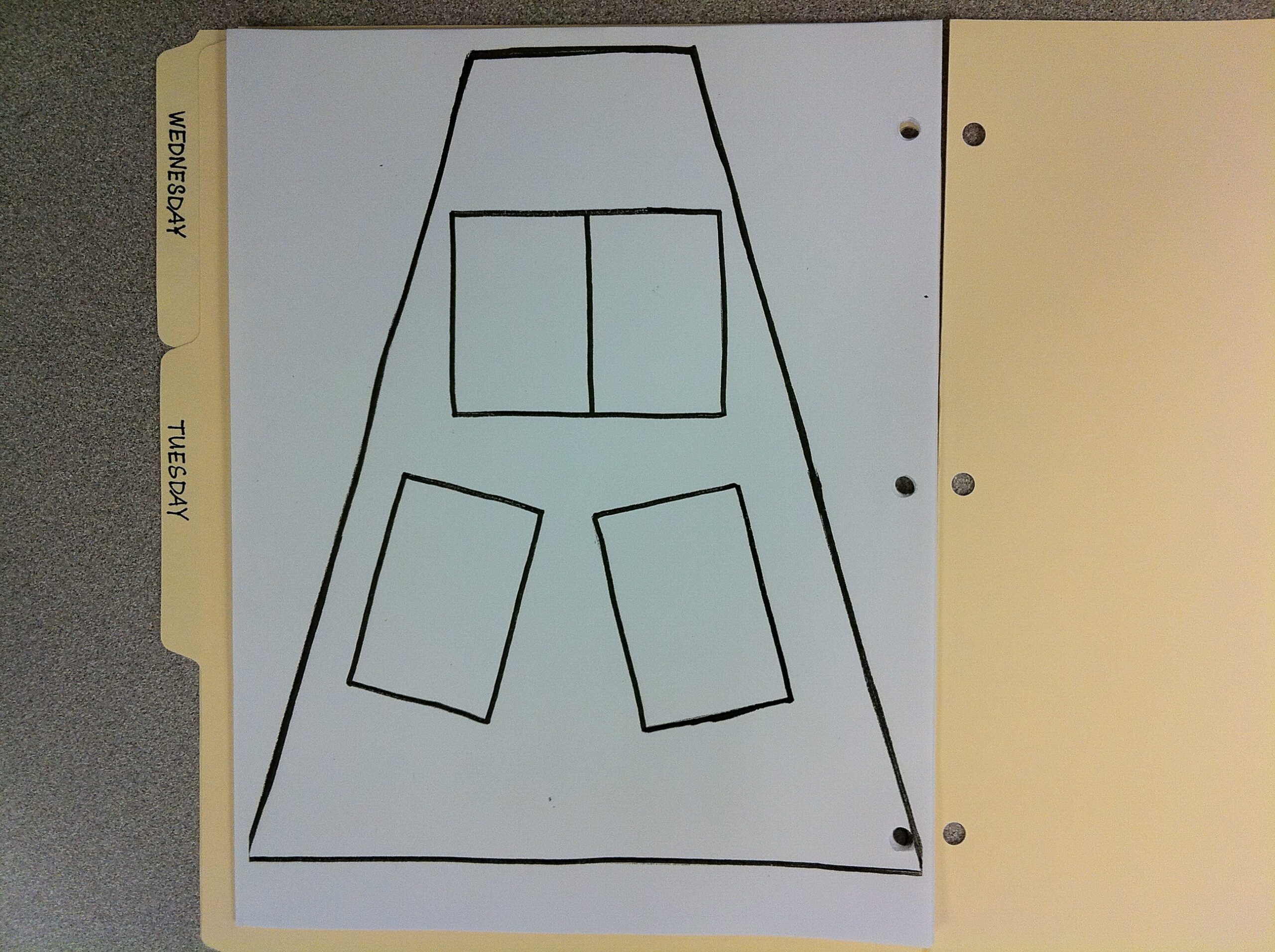
I do blank,  hand- written seating charts designed for my triangle shaped room (old school) and always in pencil. I move kids around as I see fit throughout the year and want to keep a current copy on hand at all times, especially for subs. Erasing and changing the second I make a seating change for behavior or accommodation is very handy.

Any other seating chart or name memory tips for art teachers out there? 

Related Posts Plugin for WordPress, Blogger...
Print Friendly

  • http://katiejophoto.wordpress.com Katie Morris

    I handwrite my seating charts to allow changes, too. I also find that looking and saying the name as much as possible helps. At first, I pass back artwork so I can say the name and match the art to the face. I would try your alphabet grouping thing except I always seem to have “multiples” in the same class! Last year in one class I had Caley, Kalee, and Kalee. I also had a class with 3 Madison’s! I don’t know why they don’t think about that…

    • http://twitter.com/lintonart Carrie Linton (@lintonart)

      last year I had a fourth grade class with 2 Haley B’s, 3 Destiny’s and 2 Cadan/Caidins! I already looked – and the Haley’s and Cadan’s are still together. But it does make it easy in some instances “Haleys, go collect the papers…”

  • http://Www.bigbendart.pbworks.com Amy

    I put my new kiddos in A-Z order too! I put all my student names on mini post-its, place each class’s seating chart in a plastic page protector, and then those go in a binder organized by day. While it takes a lot of time to initially write all the kids names on the post-its, I’ve used the same ones for going on 4 years! I just rearrange the post-its when a student needs a new seat, someone moves or when it’s a new school year!

  • Dale

    Yes, I have seating charts in a notebook by the day. This is also helpful for a sub. My worst problem is calling a student by their brother’s or sister’s name. I know some of my younger students are going to be glad that their sibling has moved on to sixth grade.

    • Vivian

      I can surely relate. I do the same and I’d wondered why, before I even know they were brothers, but then it made sense… :)

  • Kathy Olson

    Hope I can describe what I do so you will get a picture of it. Sorry, no photos. I have my own art room so at each of my tables I have a metal bookend. I drilled 2 holes at the top of each bookend, and use 2 loose leaf rings to hold tagboard squares. With a black marker I write the names of the students by class on the squares and at the end of each period students flip the card to the next class. I can easily glance at the card and call out the student’s name. I can make new cards when table groups change. Hope this makes sense. It works really well for me.

    • Karen

      I like the idea. It seems like a lot of initial work, but my individual name cards/tents are driving me crazy. The kids are constantly rearranging them or stacking them all up into one pile. Last year they never did this. I hate having to carry around a seating chart and I love having the names there especially w/ little ones when I am putting readable names on their papers. This would also save a lot of time putting the name stack out 2 times each day.

  • Anonymous

    Jessica, I am prepping for the school year and plan to implement a ton of your ideas this year. Although not a new teacher, it is exciting and refreshing to try new things and your toolkit is great! I can’t wait to start the new year by using a few of them!
    -Sarah

  • http://gravatar.com/polkand2nd polkand2nd

    Jessica, I am prepping for the new year and can’t wait to use some for your techniques and ideas! Although not a new teacher, I am inspired, refreshed, and excited to steal a few tools from your tool kit!
    Sarah

  • http://artprojectgirl.blogspot.com artprojectgirl

    Fabulous Idea! I’m totally doing this:) THANKS

  • CherriR

    Last year I started using an iPad app. Teacherkit let’s you set up each class, photo each student, arrange students ABC order or seating chart, mark attendance, record grades, track behavior… It is easy and fun to use! I can also look at the students photos at home if I want to double check a student’s name.